

Social media post planner – how to manage content publishing across multiple channels without chaos
Social media has become one of the most important marketing channels for businesses. Whether you run a marketing agency, manage your company’s profile, or are a content creator—regular content publishing is now essential for building online visibility.
However, the problem appears very quickly.
Facebook, Instagram, LinkedIn, TikTok, Google Business Profile… each of these channels requires regular posting, and manually managing content starts to consume a huge amount of time.
Właśnie dlatego coraz więcej firm korzysta z narzędzi takich jak planer postów A well-designed post planner allows you to:
- plan content publishing in advance
- publish posts across multiple platforms simultaneously
- manage multiple profiles and brands
- analyze publication performance
- save time for the marketing team
As a result, instead of logging into several platforms every day and publishing content manually, you can prepare an entire communication calendar even weeks in advance.
Dlaczego ręczne publikowanie postów szybko przestaje działać
NWhy manual post publishing quickly stops working
At the beginning, many companies publish posts manually.
The process usually looks like this:
- preparing graphics
- writing the post
- logging into Facebook
- publishing
- repeating the same process for Instagram, LinkedIn, or TikTok
With just one social media channel, this might still be manageable. However, as a company grows its marketing efforts, the number of posts quickly increases.
A typical scenario looks like this:
- a company runs a Facebook profile
- an Instagram profile
- a LinkedIn profile
- a Google Business profile
- sometimes TikTok or YouTube
If you publish 4–5 posts per week, it quickly becomes clear that manual publishing starts taking up several hours weekly.
For marketing agencies, the problem is even bigger.
A social media agency often manages:
- 5 clients
- 10 clients
- sometimes even dozens of brands at once
Each client has their own profiles and publishing schedule.
Without the right tools, managing all of this starts to feel like chaos.
What is a social media post planner
PA post planner is a tool that allows you to schedule content publishing on social media in advance and manage all channels from a single place.
Instead of manually posting every day, you can prepare your posts ahead of time and set the exact date and time for publication.
Modern post planners allow you to:
- schedule posts on Facebook, Instagram, LinkedIn, and other platforms
- manage multiple profiles from one dashboard
- create a publication calendar
- analyze post performance
- automate publishing
This makes the entire social media management process much simpler and more organized.


Managing multiple profiles and brands in one place
A post planner is especially useful when managing more than one social media profile.
This could be, for example:
- a marketing agency managing clients
- a freelancer handling profiles for several brands
- a company with multiple brands
- a marketer responsible for several projects at once
With this approach, all profiles can be managed from a single place.
You don’t need to switch between accounts, remember passwords, or log in to different tools.
From one dashboard, you can:
- select a client profile
- schedule a post
- check post history
- analyze performance
This approach greatly simplifies daily social media management.
Publishing posts across multiple platforms simultaneously
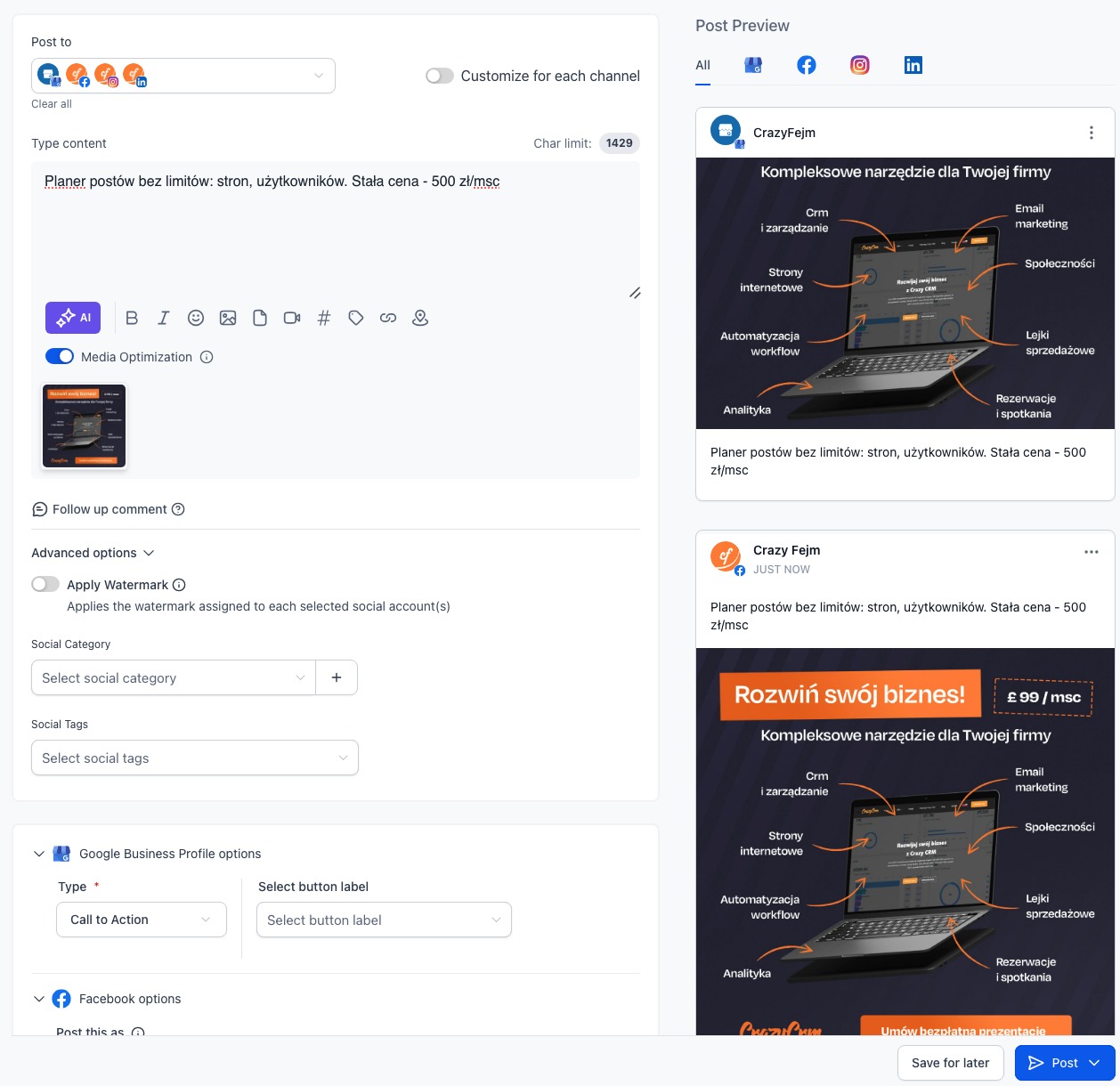
One of the biggest advantages of a post planner is the ability to publish content on several platforms at once.
Instead of creating the same post separately for each platform, you can create it once and publish it simultaneously across multiple channels.
In practice, a single post can be scheduled at the same time for:
- TikTok
- YouTube
- Google Business Profile
Everything is done from one dashboard, without the need to log in to each platform separately.
For marketers and business owners, this means a huge time saving.


Post Planner for Marketing Agencies
PA post planner is especially important for social media agencies.
Agencies often manage many clients at the same time, and each client has their own profiles and individual communication strategy.
Without the right tool, managing publications for several or a dozen clients quickly becomes difficult and time-consuming.
Another challenge is the cost of social media management tools.
Many popular systems on the market use a pricing model based on:
- the number of users
- the number of social media profiles
- the number of clients
- the number of posts
In practice, this means that as the agency grows, the cost of tools increases as well.
Many small and medium-sized agencies today pay even several thousand dollars per month for social media management systems.
Post Planner in Crazy CRM
The post planner is an especially important tool for social media agencies.
From a single panel, you can:
schedule post publications
manage multiple social media profiles
create a content calendar
analyze performance statistics
manage comments
Importantly, the post planner is part of a larger marketing system that also includes CRM, marketing automation, and client management features.
This means that social media are not a separate communication channel but an integral part of the company’s overall marketing process.
Post Planner Features – How to Schedule Social Media More Quickly and Effectively
Schedule a Free System Demo
If you want to see the post planner in action, you can schedule a free system demo.
During this short session, we will show you how to:
- schedule posts across multiple profiles at once
- manage your content calendar
- analyze post performance
- use social media as part of your overall marketing system
Having a post planner is just the beginning.
The real value comes when the tool allows you to organize the entire publishing process – from content creation, through scheduling, to performance analysis.
Modern post planning tools offer much more than just setting a publication date. In practice, they become a central hub for managing your social media communication.
In this section, we will highlight the key features that a good post planner should have – especially if you manage multiple profiles or provide marketing services for clients.

Publication Calendar – A Central Place for Content Planning
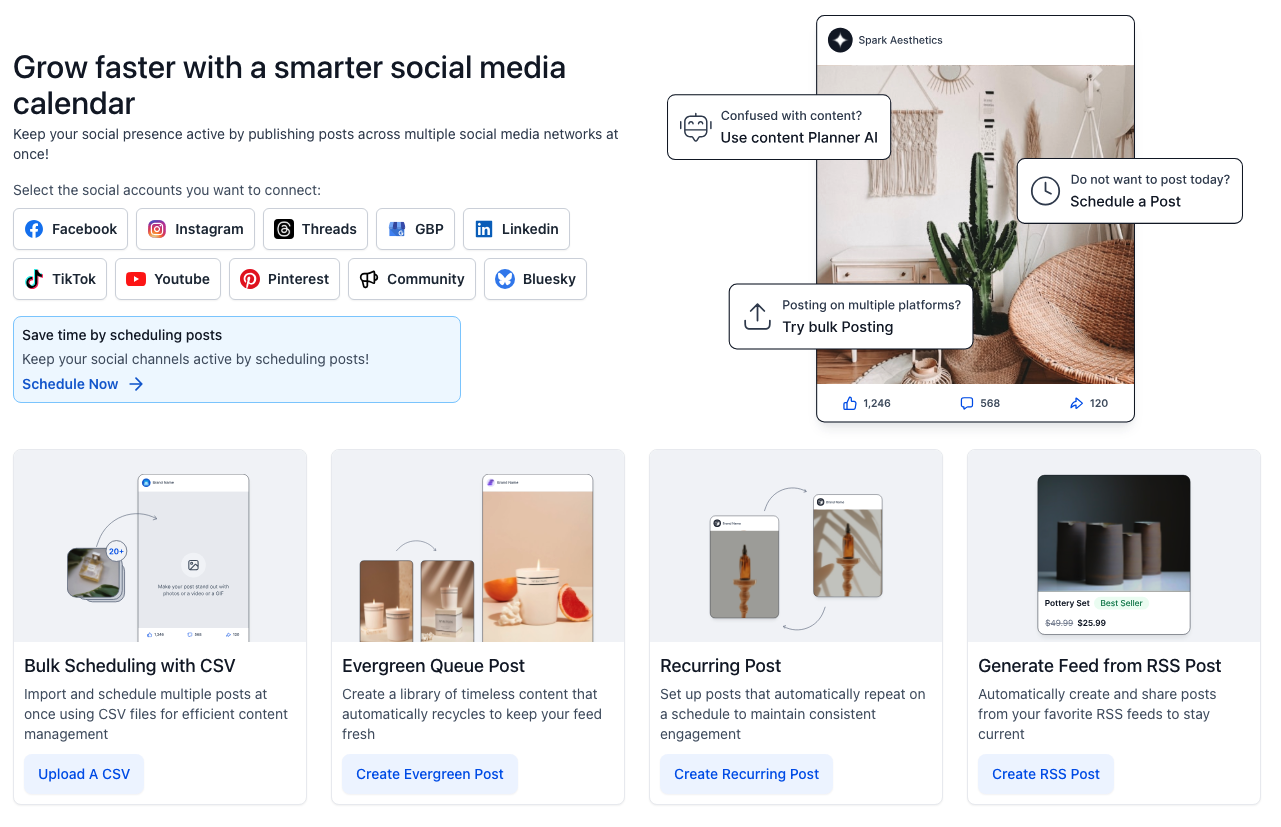
Jedną z podstawowych funkcji planera postów jest kalendarz publikacji social media. Dzięki niemu wszystkie zaplanowane posty można zobaczyć w jednym miA publication calendar allows you to see all planned posts along with their publication date, platform, and post status. In practice, this means that instead of managing your publishing schedule in Excel sheets or Google Docs, the entire communication plan is stored in a single system.
A typical publication calendar allows you to:
- view all scheduled posts
- check the publication history
- edit posts before publishing
- filter posts by platform
For companies and agencies, this is a huge convenience because it allows you to control marketing communication over a longer time horizon.
For example, you can schedule:
- a full week of posts
- a monthly post calendar
- a marketing campaign spanning several weeks
This makes post publishing an organized process rather than a daily task done manually.
Scheduling Multiple Posts at Once
JOne of the most useful features for marketers is the ability to schedule multiple posts at once. Instead of publishing one post per day, you can prepare a whole batch of content and schedule it in advance.
In practice, it works like this:
- create graphics and text for your posts
- add them to the scheduler
- set the publication date
- the system automatically publishes the posts
This allows you to prepare even a dozen posts in just one hour.
It’s especially useful for:
- marketers managing multiple channels
- freelancers handling client accounts
- social media agencies
In practice, many companies today prepare their entire publication calendar once a week or once a month.


Grouping Client Profiles
KolejnA very useful feature for agencies is the ability to group social media profiles. If you manage several clients, each of them usually has multiple communication channels:
- Google Business Profile
- TikTok
The post scheduler allows you to combine these profiles into a single group assigned to a specific brand. This makes it easy to manage publishing for individual clients. For example:
- Client A – all profiles in one group
- Client B – a separate group
- Client C – a separate set of profiles
This significantly simplifies managing publication across multiple brands.
Publication History and Content Management
For larger marketing teams, it is very important to quickly check which posts have already been published.
The post scheduler allows you to view the full publication history along with information about:
publication date
platform
post status
image or video content
Thanks to this, you can easily:
find previous posts
copy post content
reuse materials
This is especially useful for evergreen content, which can be published cyclically.
The post scheduler integrated with the comment management system allows you to handle all interactions in one place.
This enables marketing teams to:
This significantly speeds up customer service on social media.
Comment Moderation Across Multiple Platforms
Another important feature is managing comments and messages from users. If a company runs several social media channels, comments can appear in different locations:
This greatly simplifies managing publication and interactions for multiple brands.
Post Statistics and Performance Analysis
Publishing posts is one thing, but it’s equally important to understand which content performs best.
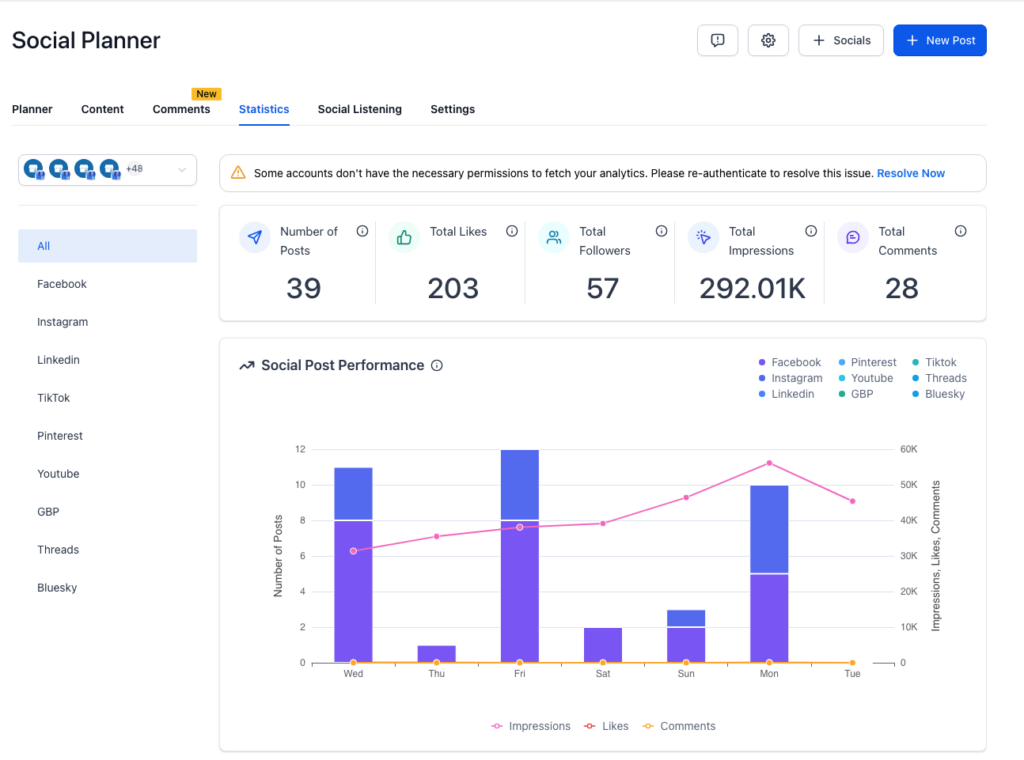
A good post scheduler should provide basic publication statistics, such as:
number of posts
number of likes
number of comments
number of views
reach
This allows you to analyze:
which posts generate the most engagement
which content formats work best
the best days to publish posts
For companies and marketing agencies, this is extremely important, as it enables continuous optimization of the communication strategy.
Automatic social media trend discovery
Modern social media management tools also include features for trend analysis.
The system can analyze popular topics, hashtags, and trends appearing online. This allows marketers to react faster to what’s happening on the internet and create content tailored to current user interests.
Schedule a Post Scheduler Presentation in Crazy CRM
Book a short system presentation. During the session, we will show, among other things:
- how to schedule posts across multiple platforms simultaneously
- how to manage client profiles
- how to create a publication calendar
- how to analyze post performance
Launching Ads from the Post Scheduler – Automatic Facebook Ads
Publishing content often looks like this:
- you create a post in the scheduler
- you publish it on social media
- you log into a separate advertising system
- you create an ad campaign
In practice, this requires switching between different marketing tools. The Post Scheduler in Crazy CRM allows you to combine these actions in a single system. Once you publish a post, you can immediately use it as part of an ad campaign and launch promotions without switching to a separate tool.
That’s why more and more companies use social media post schedulers. Thanks to the integration with the advertising system, you can:
- create ad campaigns directly from the system
- promote published posts
- drive traffic to websites and landing pages
- collect leads from ads
- analyze campaign performance
This approach greatly simplifies marketing management, as content publishing and advertising promotion become part of a single process. For many companies, this means significant time savings. Instead of working in multiple marketing tools, you can manage:
- post publishing
- ad campaigns
- lead generation
- customer management
…all within one system.
Post Scheduler + CRM – Why It Changes the Way You Do Marketing
Most post scheduling tools work in a very similar way. They let you:
- schedule a post
- set a publication date
- view basic statistics
And that’s usually where their capabilities end. In practice, traditional social media schedulers are just one small part of the overall marketing process. Social media don’t exist in isolation – their main goals typically include:
- acquiring customers
- building relationships with your audience
- generating sales inquiries
- driving traffic to your website
That’s why more and more companies are looking for solutions that not only publish posts but also manage the entire marketing process. This is where the advantage of systems like Crazy CRM becomes clear.
Why Most Post Schedulers Are Limited
TA typical post scheduler works as a standalone tool. Usually, it looks like this:
- you publish a post on social media
- someone comments or sends a message
- someone clicks a link
- someone fills out a form
Then all this data ends up scattered across different systems. For example:
- posts are in the social media scheduler
- forms are in a separate tool
- customer data is in the CRM
- marketing automation is in yet another platform
The result is that marketing becomes fragmented across multiple tools. For many companies, this leads to:
- higher costs
- more logging into different systems
- lack of a complete view of marketing activities
That’s why more and more businesses are seeking systems that combine multiple functions in one place.
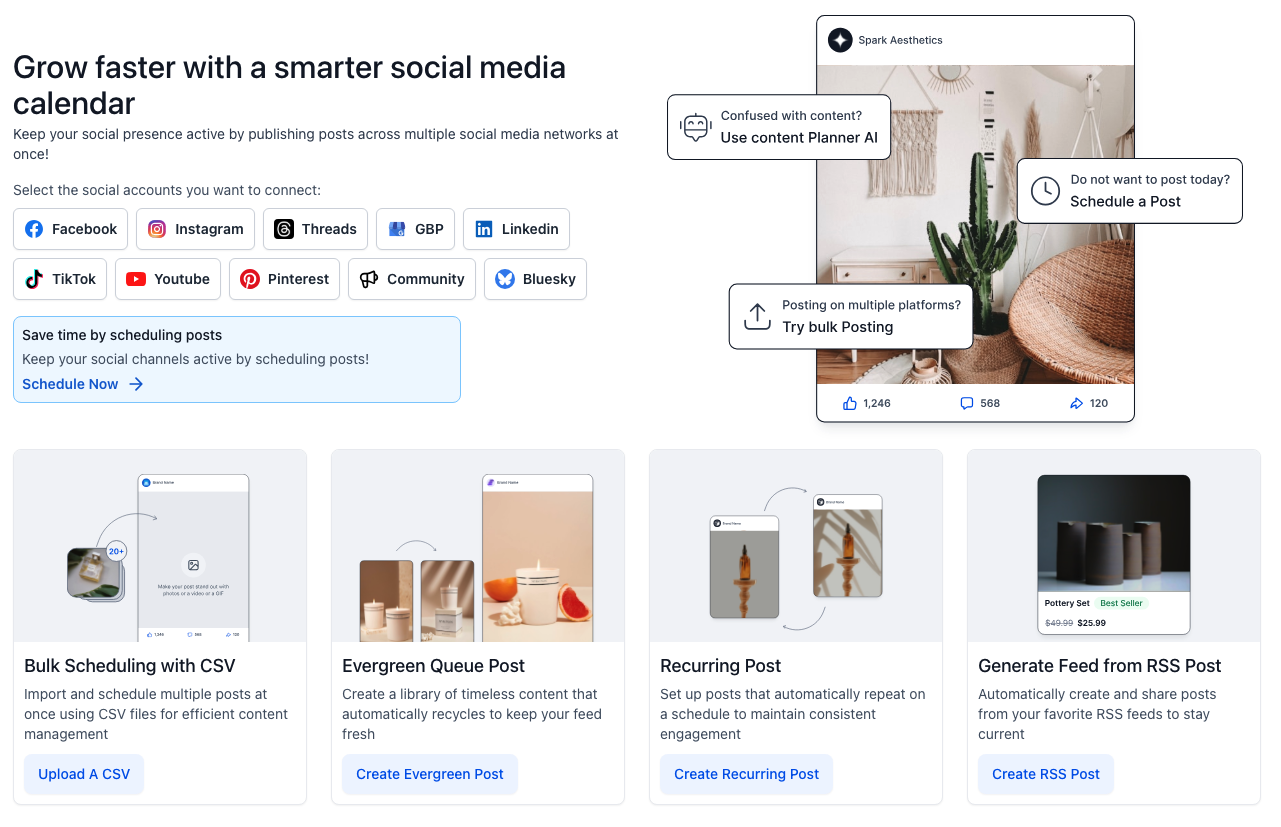
Post Scheduler in Crazy CRM
The post scheduler in Crazy CRM is part of a larger marketing system. This means that publishing content on social media can be directly connected with:
- customer management
- marketing automation
- sales campaigns
- marketing performance analysis
This allows companies to manage their entire marketing process in a single system.
Social Media as Part of the Entire Marketing System
W nowoczesnym podejściu social media nie są tylko kanałem publikacji treści. Stają In a modern approach, social media is not just a channel for publishing content – it becomes part of the company’s overall marketing process. A typical workflow might look like this:
- You publish a post on social media
- A user clicks on a link
- They land on a website or landing page
- They leave their contact information
- The data is captured in the CRM
- An automatic message is sent to the user
- A salesperson receives a notification
This model transforms social media from just a communication channel into a real source of customers.
Marketing Analytics and Performance Tracking
One of the most important marketing features is the ability to analyze performance results. The system allows you to track metrics such as:
number of posts
number of likes
post reach
comments
profile growth
This makes it easy to identify which marketing activities deliver the best results.
This is especially valuable for:
marketing agencies
individual marketers
companies running intensive social media campaigns
How Much Does a Social Media Post Planner Cost for Agencies and Companies
One of the biggest challenges in the social media tools market is cost. Many popular systems use a pricing model based on:
- the number of users
- the number of social media accounts
- the number of clients
In practice, this means that the larger the agency or company, the more expensive the tool becomes. Many marketing agencies today pay:
- 2,000 PLN
- 3,000 PLN
- and sometimes even over 4,000 PLN per month
for social media management tools. For growing companies, this can be a significant expense.
Who Is the Post Planner in Crazy CRM For
The Post Planner in Crazy CRM is part of a larger marketing system. It can be used by various types of users, most commonly:
Marketing Agencies
who manage multiple clients and need a central tool for scheduling and publishing content.
Freelancers and Marketers
who handle profiles for several brands or projects.
Business Owners
who want to organize their company’s marketing communications.
Content Creators
who publish content across multiple social media channels.
Crazy CRM Pricing Model – One Price, No Limits
Crazy CRM uses a completely different approach. Instead of charging for:
- users
- profiles
- clients
the system works on a single fixed license model. Currently, this means: 500 PLN per month or 99 GBP per month.
With one license, you get access to:
- the Post Planner
- the CRM system
- marketing automation
- client management
This way, the cost of the tool does not increase as your company or agency grows.
Schedule a Free Crazy CRM Demo
If you want to see how the Post Planner works in practice, you can schedule a short system demo.
During the session, we will show you:
- how to plan posts across multiple profiles at once
- how to manage your content calendar
- how to analyze post performance
- how to connect social media with CRM and marketing automation


Summary
The Post Planner is now one of the essential tools for marketers, agencies, and companies active on social media.
It helps organize the content publishing process, plan marketing communication in advance, and manage multiple channels from a single platform.
At the same time, more and more companies are realizing that the greatest value comes from combining a post planner with a CRM system and marketing automation.
This way, social media become not just a channel for publishing content, but a real part of a customer acquisition system.
Frequently Asked Questions about Post Planners (FAQ)
Many companies, marketers, and agencies visit our site looking for tools to schedule social media posts. Below, we answer the most common questions about post planners and managing communication across social media channels.
The best post planner is one that allows you to manage all your social media channels in a single place and automate content publishing. In practice, a good system should enable you to:
- plan post publications
- manage multiple profiles
- analyze performance statistics
- handle comments and interactions
- integrate with other marketing tools
The post planner available in Crazy CRM combines all these features with a CRM system and marketing automation, turning social media into a fully integrated part of your customer acquisition process.
TakModern post planners allow you to publish content across multiple platforms simultaneously. The most commonly supported channels include:
- TikTok
- YouTube
- Google Business Profile
This means you can create a single post once and publish it simultaneously across several channels.
The process of scheduling posts is very simple:
- Prepare the post content and graphics
- Add the post to the planner
- Select the platforms for publication
- Set the date and time for the post
The system will automatically publish the post at the scheduled time. This allows you to plan even several weeks of marketing communication in advance.
Agencies need a tool that allows them to manage multiple clients simultaneously.
For this reason, a social media post planner should enable:
- Managing multiple social media profiles
- Managing clients
- Maintaining a publication calendar
- Analyzing post performance
- Moderating comments
With Crazy CRM, all these features are available in a single platform that also includes CRM and marketing automation.
Yes. Today, social media is one of the main channels for acquiring clients. When a post planner is integrated with a CRM system, it enables a complete marketing workflow:
- Publishing a post
- Clicking on a link
- Filling out a form
- Adding the contact to the CRM database
- Triggering automated marketing communication
This way, social media become a real source of sales leads.
Search Phrases Leading Users to Crazy CRM
Companies and marketers often find our website while searching on Google for tools to manage social media and schedule posts. The most common search queries include:
- post planner
- social media post planner
- tool for scheduling posts
- Facebook Instagram post planning
- social media publishing calendar
- social media planner
- how to plan posts on social media
- post planner for marketing agencies
- managing social media for multiple clients
- post publishing tool
Crazy CRM was created to simplify social media marketing management and combine post scheduling with a CRM system and marketing automation.
Social media post planner